The best inventory management software in 2026
Selling across multiple channels, locations, and fulfillment partners is not compatible with manual tracking. As order volumes pick up, so does inventory management complexity, and spreadsheets or Shopify’s native inventory can no longer keep up. Teams find themselves battling the fulfillment errors and stockouts that manual tracking reliably creates.
The best inventory management software fixes those growth pains. It is the operational layer that gives your team one accurate number for every SKU, across every location and channel, that updates the moment something moves. This guide covers eight tools across the full SMB range, with verified pricing, G2 ratings, and limitations for each.
See how Katana handles multi-channel inventory.
What is inventory management software?
At its core, inventory management software maintains one live record of your stock, shared across every channel and location. The system separates committed inventory from available inventory, and both figures update with each transaction. That separation is what prevents a unit allocated to a wholesale order from showing as available on your Shopify store.
The right system does more than track stock. It manages purchasing cycles and sets reorder points per SKU. It should also connect to your sales channels and accounting tools to pull orders and costs into the same record. For businesses that make or assemble products, it also handles bills of materials and production workflows, linking sales orders directly to what needs to be built.
Most product businesses switch to dedicated software for the same reason: manual reconciliation is consuming more time than it saves, and the risk of error is growing.
Shopify’s guide to inventory management puts it plainly: the difference between manual and automated inventory tracking shows up most clearly at the moments of highest order velocity – the exact moments you can least afford a mistake.
How we chose these tools
We evaluated tools on feature depth for SMB use cases, pricing transparency, integration coverage with major ecommerce and accounting platforms, G2 and Capterra review scores, and fit across three operational types: finished-goods retail, multi-channel ecommerce, and light manufacturing or assembly.
How do the top inventory management tools compare?
|
Tool |
Best for |
Free plan |
Starting price |
Shopify sync |
Production support |
G2 rating |
|---|---|---|---|---|---|---|
|
Katana |
Multi-channel brands that manufacture or assemble |
✓ |
$299/mo |
✓ |
✓ |
4.4/5 |
|
Cin7 Core |
High-volume omnichannel retailers |
✗ |
$349/mo |
✓ |
✓ (Pro+) |
4.2/5 |
|
inFlow |
Small-to-mid-size product businesses |
✗ |
$186/mo |
✓ |
Add-on |
4.4/5 |
|
Zoho Inventory |
Early-stage, single-channel sellers |
✓ (50 orders/mo) |
$29/mo (annual) |
✓ |
Limited |
4.4/5 |
|
Fishbowl |
Businesses deeply embedded in QuickBooks |
✗ |
$229/mo (annual) |
✓ |
✓ |
4.0/5 |
|
Ordoro |
Ecommerce brands focused on shipping and fulfillment |
✓ (shipping only) |
$349/mo (inventory) |
✓ |
✗ |
4.8/5† |
|
NetSuite |
Enterprise-level, complex operations |
✗ |
Custom |
✓ |
✓ |
4.1/5 |
|
Sortly |
Simple asset and stock tracking |
✓ |
$49/mo |
✗ |
✗ |
4.3/5† |
Each of these tools is genuinely capable in its category. The question isn’t which one has the longest feature list, but which fits the your business needs.
the 8 best inventory management software tools
1. Katana — best for multi-channel brands that manufacture or assemble products
G2: 4.4/5 | Free plan available; Core from $299/month
Product businesses that sell across multiple channels and build or kit products operate two inventory challenges at once. Stock needs to stay accurate as orders come in from Shopify, Amazon, wholesale portals, and 3PLs simultaneously. Raw materials need to be tracked separately from finished goods, and production needs to consume the right components and update stock counts automatically as work progresses.
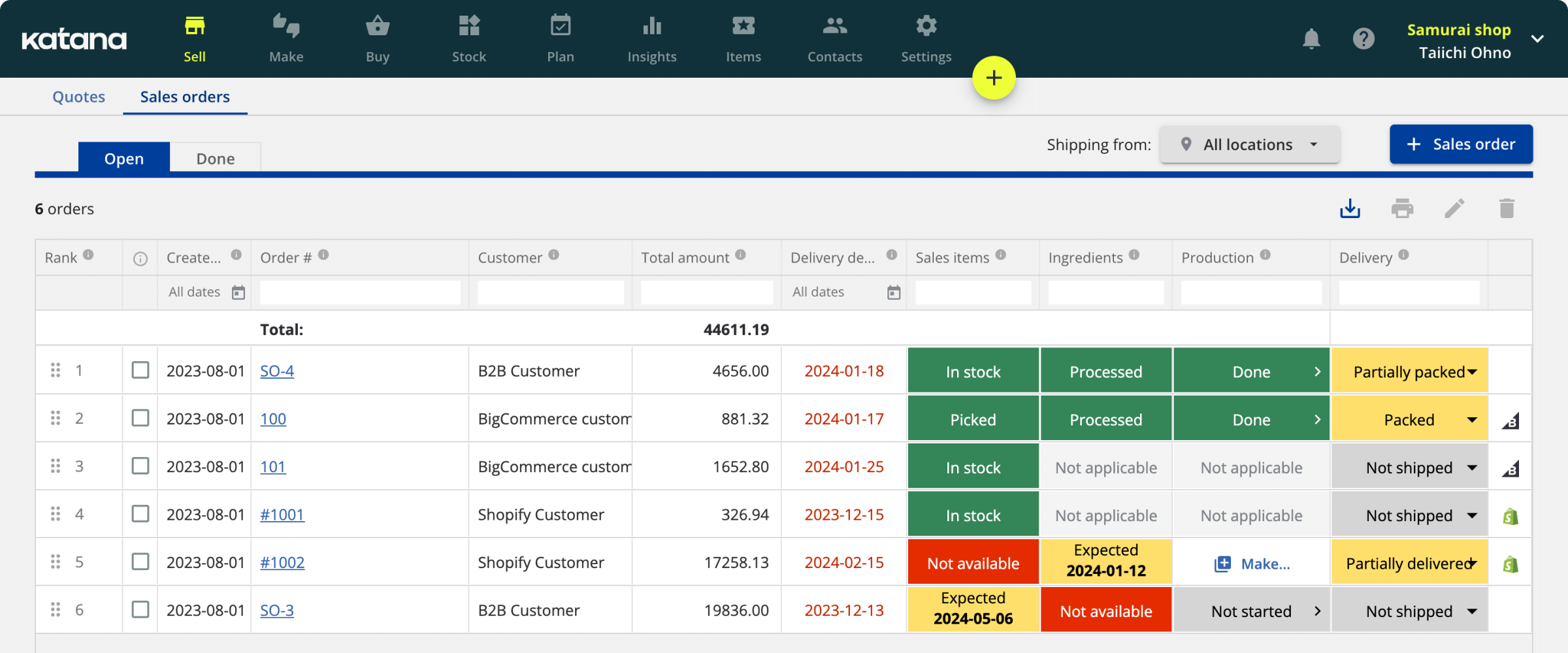
Katana connects both sides of that operation in a single inventory record. Purchasing, production, sales orders, and stock movements update in real time. The available-to-sell number reflects what has been committed across every channel and every location, not just what is physically on a shelf.
The Shopify integration is bidirectional: orders flow in, stock updates immediately, and fulfillment routing triggers automatically. The same live stock feeds Amazon and wholesale orders without manual reconciliation between systems. Across the businesses Katana works with, inventory value shifts by over 60% month over month even outside peak seasons. Inaccurate counts at that velocity create fulfillment errors and reorder delays that a dedicated inventory layer prevents.
For businesses that build or assemble, Katana includes bill of materials management, production order tracking, and manufacturing cost calculations. A sales order flows directly into a production workflow, consuming raw materials and updating finished goods inventory as output is recorded. This combination of multi-channel inventory and production management is the capability most mid-range inventory tools do not cover at this price point.
Other features relevant to growing SMBs: purchase order management with supplier lead times, barcode scanning, batch and serial number tracking, and direct integrations with QuickBooks Online, Xero, and major 3PL providers.
Implementation typically takes six weeks with a dedicated onboarding manager. That is significantly faster than a full ERP deployment, which typically runs six to twelve months.
Main strengths
- Real-time bidirectional sync across Shopify, Amazon, wholesale, and 3PL channels
- BOM management, production order tracking, and manufacturing cost calculations
- Committed stock separated from available stock across all locations
- Flat-rate subscription pricing with no per-order fees
- Free plan for up to 30 SKUs with unlimited users and locations
Pricing: Free plan (up to 30 SKUs, unlimited users, unlimited locations, all integrations); Core from $299/month (unlimited SKUs and users, usage-based on order volume and locations). Manufacturing management, traceability, and warehouse management are available as add-ons.
One limitation: Manufacturing routings, shop floor management, and manufacturing cost insights require add-ons on top of the Core plan. Businesses with complex production workflows should factor add-on costs into their total monthly budget before comparing against other tools.
2. Cin7 Core — best for high-volume omnichannel retailers
G2: 4.2/5 | From $349/month
Cin7 Core is a connected inventory platform for businesses running high order volumes across multiple sales channels. It covers inventory, purchasing, warehouse management, B2B portals, and point of sale in one system, with over 700 integrations including Shopify, Amazon, eBay, WooCommerce, QuickBooks Online, and Xero.
The platform suits retailers and wholesalers with established operations managing complex channel mixes. EDI support handles compliance requirements for brands supplying major retailers. Material requirements planning is available from the Pro tier.
Key strengths
- 700+ integrations covering major ecommerce, marketplace, and accounting platforms
- EDI capability for retail and wholesale compliance
- Advanced warehouse management on the Advanced tier
- High order volume capacity: 6,000 orders/year on Standard, 24,000 on Pro
- B2B portal included across plans
Pricing: Standard $349/month (5 users, 6,000 orders/year, 2 ecommerce integrations); Pro $599/month (10 users, 24,000 orders/year, MRP); Advanced $999/month (15 users, 120,000 orders/year, advanced WMS); Omni: custom. 14-day free trial available.
One limitation: Onboarding is complex and support quality is flagged repeatedly in G2 reviews. Businesses without a dedicated operations person to lead implementation should account for that time cost before committing.
3. inFlow Inventory — Best for small product businesses with a wholesale or B2B sales channel
G2: 4.4/5 | From $186/month
inFlow covers stock tracking and order management for businesses handling physical products. It splits into two separate products: inFlow Inventory for order and inventory management, and inFlow Manufacturing for kitting and assembly. Both can be purchased separately or together. The interface is approachable and the flat-rate pricing structure makes costs predictable as teams grow.
A built-in B2B Showroom lets wholesale buyers place orders directly without a separate portal. Integrations include Shopify, WooCommerce, Etsy, eBay, QuickBooks Online, and Xero.
Key strengths
- Clean, low-training-requirement interface
- Built-in B2B Showroom for wholesale order management
- Flat-rate pricing not tied to user count
- Barcode generation and scanning on all plans
- Kitting and assembly available via inFlow Manufacturing
Pricing: Entrepreneur $186/month (2 users, 100 orders/month, 1 location, 1 integration); Small Business $436/month (5 users, 1,000 orders/month, unlimited locations, 2 integrations); Mid-Size $999/month (10 users, 5,000 orders/month, 3 integrations). 14-day free trial available.
One limitation: Integration count is capped by plan tier. The Entrepreneur plan allows only one integration, which limits multi-channel setups from the start. Manufacturing features require the separate inFlow Manufacturing product rather than being built into the core subscription.
4. Zoho Inventory — best free option for early-stage, single-channel sellers
G2: 4.4/5 | Free plan; paid from $29/month (annual)
Zoho Inventory is a cloud-based inventory system suited to small businesses managing stock on one or two channels. It covers stock tracking, purchase and sales order management, basic warehouse management, and multi-channel selling. The free plan is functional for low-volume operations. Paid plans scale at competitive prices within the Zoho ecosystem.
Businesses already using Zoho Books, Zoho CRM, or Zoho Commerce gain the most. The ecosystem integration eliminates duplicate data entry across platforms.
Key strengths
- Free plan covering 50 orders/month and 2 locations
- Paid entry point at $29/org/month billed annually
- Shopify, Amazon, eBay, and Etsy integrations on paid plans
- Batch and serial number tracking available from the Professional tier
- Native integration with Zoho Books, CRM, and Commerce
Pricing: Free (50 orders/month, 1 user, 2 locations); Standard $29/org/month (500 orders/month, 2 users, annual billing); Professional $79/month; Premium $129/month; Enterprise $249/month. Month-to-month billing available at higher rates.
One limitation: User counts per plan are low: Standard through Premium support only 2 users. Teams beyond two people need to move to Enterprise at $249/month for 7 user seats. This makes mid-tier plans a poor fit for businesses with more than one person managing inventory day to day.
5. Fishbowl — best for businesses deeply embedded in QuickBooks
G2: 4.0/5 | From $229/month (billed annually)
Fishbowl is an inventory and manufacturing platform built around deep QuickBooks integration, supporting both QuickBooks Online and Desktop. It covers inventory tracking, warehouse management, purchasing, manufacturing with BOMs and work orders, and order fulfillment. Inventory transactions update QuickBooks records automatically via bidirectional sync, eliminating the manual export cycle that causes reconciliation errors.
For businesses that have built their financial operations around QuickBooks and need inventory and manufacturing capability beyond what their accounting tool provides, Fishbowl is the most established option in this specific combination.
Key strengths
- Deepest QuickBooks integration available, supporting both Online and Desktop versions
- Full manufacturing module including BOMs, work orders, and MRP
- Multi-location inventory with lot, serial, and expiry date tracking
- Barcode scanning on all plans
- Cloud-native across all current pricing tiers
Pricing: Essentials $229/month (2 users, billed annually); Growth $429/month (5 users, billed annually); Scale $729/month (10 users, billed annually); Advanced: custom. A mandatory implementation package is required at purchase.
One limitation: Implementation is non-optional and adds upfront cost. Advanced ecommerce integrations and AI manufacturing features are add-ons beyond the base subscription. Businesses with complex ecommerce requirements should verify integration coverage for their specific channels before committing.
6. Ordoro — best for ecommerce brands focused on shipping and fulfillment
G2: 4.8/5 † | Shipping free; Inventory from $349/month
Ordoro sells three separate products (Shipping, Inventory, and Dropshipping), which can be purchased independently or as a bundle. The Shipping product is free and covers multi-channel order routing, carrier rate comparison, and label printing across Shopify, Amazon, WooCommerce, and other channels. The Inventory product adds real-time stock tracking, low-stock alerts, kitting, and inventory sync across channels.
The free Shipping plan gives ecommerce businesses a functional entry point for fulfillment automation before adding inventory tracking.
Key strengths
- Free Shipping plan with genuine multi-channel order routing and label printing
- Strong carrier integration covering major domestic and international options
- Kitting support for bundled products
- Real-time inventory sync across major ecommerce channels
- Clean interface with a short setup time
Pricing: Shipping: free (15-day trial on paid tiers); Inventory from $349/month; Dropshipping from $299/month; bundled pricing available via sales. 15-day free trial on all paid plans.
One limitation: Ordoro is built shipping-first. It handles finished-goods inventory tracking well but does not support production tracking, raw material management, or detailed cost calculations. Businesses needing those capabilities need a different platform.
† Rating based on 14 G2 reviews. Treat with caution until more review data accumulates.
7. NetSuite — best for enterprise-level, complex operations
G2: 4.1/5 | Custom pricing
NetSuite is Oracle’s cloud ERP platform, covering financial management, inventory, order management, warehouse management, CRM, and ecommerce in a single system. Inventory is one module within a broader operational platform, not a standalone product.
The platform handles multi-subsidiary operations, multiple currencies, advanced demand planning, and complex fulfillment workflows at a scale standalone inventory tools cannot match.
Key strengths
- Single platform for finance, inventory, CRM, and ecommerce with no integration required between them
- Multi-entity and multi-currency support for complex organizational structures
- Advanced WMS and demand planning modules available
- Highly customizable with SuiteScript and SuiteFlow automation tools
- Large ecosystem of certified implementation partners globally
Pricing: Custom, quote-based. Base platform typically starts around $999/month plus $99–199 per user per month. Annual contracts are standard. Implementation typically costs $25,000–$100,000+ depending on scope. Total first-year cost for most deployments exceeds $50,000.
One limitation: NetSuite is not a fit for most small or mid-size businesses. Implementation requires months, dedicated IT resources, and typically a certified partner. Consider it only after outgrowing mid-market inventory tools.
8. Sortly — best for simple asset and stock tracking
G2: 4.3/5 † | Free plan; from $49/month
Sortly is a visual inventory tool built for tracking items by photo, QR code, and location. It suits businesses that need to know where things are and how many they have (tools, equipment, supplies, and light product inventory) without the complexity of order management or channel sync. The mobile app supports barcode scanning, stock counts, and item check-out workflows from any device, including offline.
It is not built for transactional ecommerce. There is no native Shopify or Amazon sync, no ecommerce order management, and no production capability.
Key strengths
- Highly visual, minimal-training-requirement interface
- Mobile-first with offline access
- Custom fields, folders, and tags for flexible item organization
- Free plan available
- Low-stock alerts and date-based reminders for maintenance or expiry tracking
Pricing: Free (1 user, 100 unique items); Advanced $49/month (2 users, 500 items); Ultra $149/month (5 users, 2,000 items); Premium $299/month (8 users, 5,000 items); Enterprise: custom. 14-day trial on all paid plans.
One limitation: Sortly does not connect to ecommerce channels. Businesses selling on Shopify, Amazon, or through wholesale need a different tool for inventory management.
† Rating based on 27 G2 reviews. Treat with caution until more review data accumulates.
Main features to look for in inventory management software
Real-time channel sync Stock should update the moment an order is confirmed, not on a delay. A sync interval of even 15 minutes creates oversell risk during high-traffic periods. Before signing up for any platform, confirm whether the channel sync is real-time or batched, and check this for each specific channel you sell on.
Multi-location visibility The system should show stock by location separately (warehouse, 3PL, retail, in-transit) and distinguish committed stock from available stock. A single aggregate number across locations is not sufficient for businesses fulfilling from more than one place.
Purchase order management and reorder points Look for the ability to create and track POs, set reorder points per SKU, and monitor supplier lead times. Reorder point automation removes the manual monitoring that causes stockouts. Confirm whether the tool sends alerts or triggers POs automatically, and which plan tier includes this.
Order management and channel routing Orders from every sales channel should arrive in one view, with the ability to route fulfillment to the right location or partner. Manual channel-by-channel order management is a primary source of errors at volume. Check whether routing rules can be automated or require manual assignment per order.
Production and assembly support Businesses that build, kit, or assemble products need bill of materials support: the ability to define what components go into each finished product and have stock consumed automatically during production. Most tools on this list handle finished goods only. If you build or assemble anything, confirm BOM support explicitly before evaluating other features.
Lot, batch, and serial number tracking Required for any product with an expiry date, a traceability requirement, or a warranty claim process. This applies to food, cosmetics, pharmaceuticals, electronics, and regulated goods. Several tools gate this feature behind higher tiers or add-ons. Confirm which plan includes it before deciding.
Accounting integration The inventory system should push cost of goods sold, landed costs, and purchase transactions to your accounting tool without manual export. QuickBooks Online and Xero are covered by most tools on this list. Businesses on QuickBooks Desktop have fewer compatible options. Verify your specific accounting tool before committing to a platform.
Reporting At minimum, the system should generate a sales-by-SKU report to support reorder planning and 80/20 analysis. Demand forecasting and inventory planning features are available on higher tiers of most platforms and are worth evaluating for businesses managing seasonal or volatile demand.
Free vs. paid inventory management software
Three tools on this list offer a functional free tier: Katana, Zoho Inventory, and Sortly.
Katana’s free plan covers up to 30 SKUs with unlimited users, unlimited integrations, and unlimited locations. All core inventory and production features are included. The constraint is the SKU limit, not the feature set. Businesses with a small, focused product catalog can use it to test the full workflow before committing to a paid plan.
Zoho Inventory’s free plan covers 50 orders per month with 1 user and 2 locations. It suits very early-stage businesses on a single channel. At 50 orders per month, most growing businesses reach that ceiling within the first few months.
Sortly’s free plan supports 1 user and 100 unique items. The item cap and single-user limit make it practical only for solo operators or the earliest stage of a business.
Free plans are a real way to test software against your own data before committing. They are not designed to support growing operations.
For paid plans, the useful benchmarks are: Zoho Inventory Standard at $29/month (annual) for simple single-channel finished-goods operations; inFlow Entrepreneur at $186/month for small multi-channel product businesses; Katana Core from $299/month for growing brands managing multiple channels, locations, or any production. NetSuite sits outside the SMB range entirely, with total first-year cost typically exceeding $50,000.
Per-order pricing (used by some tools not covered here) scales costs sharply as volume grows. Flat-rate subscriptions give more predictable cost structures for businesses with increasing order volume.
How to choose inventory management software for your business
The right tool depends on your operational shape, not your revenue. Four questions narrow the field.
Do you sell on more than one channel? Single-channel sellers (one Shopify store, no wholesale, no Amazon) can start with Zoho Inventory’s free plan or inFlow’s entry tier. Multi-channel sellers need real-time sync across every channel from a single stock pool. If your operation also involves any production or assembly, that combination narrows the field considerably — Katana is one of the few tools at the SMB price point that covers both in one system. For multi-channel selling without production, Cin7 and Ordoro are strong options depending on order volume and fulfillment complexity.
Do you build, kit, or assemble anything? This question filters more tools than any other. Most inventory software handles finished goods only. At the SMB price point, Katana, Fishbowl, and Cin7 (Pro tier and above) support BOMs and production workflows. Of those, Katana is the most accessible for businesses also selling across multiple ecommerce channels. inFlow Manufacturing handles kitting as a separate product add-on. Zoho Inventory, Ordoro, and Sortly do not support production. Confirm this before evaluating other features.
How many locations do you operate across? Single-location businesses have the widest choice. Multi-location businesses (two warehouses, a 3PL, a retail location) need the system to track and separate stock per location in real time. Several tools cap locations on entry plans. Confirm location limits per plan tier before selecting.
What accounting tool are you on? Most tools integrate with QuickBooks Online and Xero. Businesses on QuickBooks Desktop have fewer options. Fishbowl is the strongest integration in that case. Businesses that need their ERP and accounting in the same platform should evaluate NetSuite, bearing in mind the cost and implementation complexity that entails.
A practical benchmark: managing more than 100 SKUs, selling on two or more channels, and spending more than a few hours per week reconciling inventory manually are reliable signals that a paid inventory tool pays for itself quickly.
FAQs
Inventory management software tracks stock levels in real time, updates counts as orders are placed and goods are received, manages purchase orders and reorder points, and connects stock data to sales channels and accounting tools. The core function is maintaining one accurate number for each SKU across every location and channel, updated continuously. For businesses also managing production or assembly, more advanced tools extend that live record to cover raw materials, work orders, and manufacturing costs — keeping purchasing, production, and sales in one system. Katana is built specifically for that combination.
Inventory management software ranges from free to enterprise contracts costing tens of thousands of dollars a year. Katana, Zoho Inventory, and Sortly each offer free plans with meaningful usage limits. Paid SMB tools start around $29/month for basic single-channel operations. Katana’s Core plan starts at $299/month and covers multi-channel inventory with full production support, using flat-rate pricing rather than per-order billing, which keeps costs predictable as order volume grows. Fishbowl and Cin7 sit in the $350–$999/month range for growing teams. NetSuite and comparable full ERP platforms use custom pricing, with first-year costs typically exceeding $50,000.
Yes. Katana’s free plan covers up to 30 SKUs and includes all core features: unlimited users, unlimited locations, and production workflows. That makes it one of the more capable free tiers in the category. Zoho Inventory’s free plan covers 50 orders per month with 1 user. Sortly’s free plan supports 1 user and 100 items. All three have usage limits that most growing businesses outgrow within the first year..
The 80/20 rule, based on the Pareto principle, describes the observed pattern where roughly 80% of revenue comes from 20% of SKUs. In practical terms, it directs reordering attention: tighter reorder points, higher safety stock levels, and faster replenishment cycles for the top 20% of SKUs by revenue, and leaner holdings on slow movers. Any inventory system that generates a sales-by-SKU report makes this analysis straightforward to run.
Inventory management software handles stock movements, order management, purchasing, and production. An ERP covers those functions plus financials, CRM, HR, and other business operations in one platform. The practical difference for most SMBs is cost and implementation time. A dedicated inventory tool like Katana typically costs $200–$1,000/month and implements in weeks. A full ERP typically costs $50,000 or more in the first year and takes months to deploy. For most SMBs selling across multiple channels and managing any production, a purpose-built inventory tool covers what they need without the overhead of a full ERP deployment.
Inventory management guide
More guides from Katana






Get visibility over your sales and stock
Wave goodbye to uncertainty by using Katana Cloud Inventory for total inventory control