
Using Excel to create an inventory management system
Should you use Excel to create your inventory management system? Learn about the application’s vast potential, as well as its shortcomings, and if you might be better off using superior inventory management software.

Excel is one of the most common tools for inventory tracking because it’s flexible and familiar.
It can work well when the catalog is small and stock moves in simple ways.
Once inventory starts moving across channels, locations, and partners, keeping the spreadsheet accurate becomes the real job – and that’s where the weekly costs show up. When updates lag or numbers conflict, stockouts and overselling follow, even if demand is steady.
How can you create an inventory management system in Excel?
If you’re running a relatively small business with a limited number of products, you might choose to start managing inventory with a spreadsheet. Here are some summary guidelines to walk you through the process.
- Identify your inventory needs
Think of the types of products you need to be managing, the quantities that you need to keep track of, and how frequently you will need to update them. It is also never too early to consider what key performance metrics you should track, depending on what inventory you work with and how your business runs best.
- Create a spreadsheet tailored to your needs
Based on the details you have identified, you can set up a spreadsheet with a column for each item of information. As you set up your spreadsheet, make sure you format it clearly and consistently so that the data will be easy to read and understand. Consider also using various color coding to highlight key information.
- Make timely updates
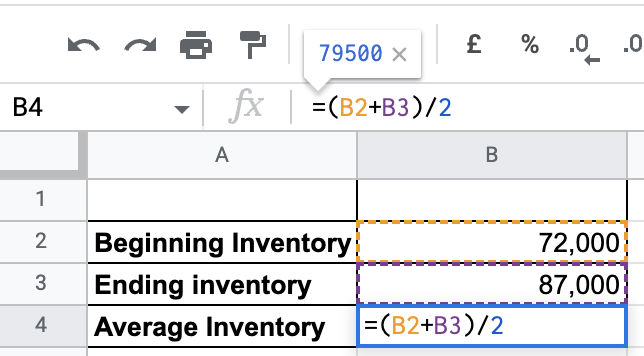
Whenever there is a change, you will need to input it manually. Update the spreadsheet to reflect any changes in inventory as they occur, such as new purchases, sales, or other adjustments. You can learn to use formulas to streamline your update process and automate some of the input, depending on changes to key details that you update manually.
- Track trends in inventory movement
Make the most of Excel charts and graphs so you can get a good visualization of trends, such as the average time that a product is in stock or if there are any potential bottlenecks or inefficient processes that may be causing inventory issues.
- Generate reports
Stay on top of your performance with regular reports on inventory levels, sales trends, and cost of goods sold. If there are different departments in your business, such as management, sales, or a marketing team, you can tailor reports for each of them to analyze.
- Monitoring
With these tools and features under your belt, you should monitor and regularly review data to identify if and where you could make improvements. You can adjust your inventory management strategy periodically, as well as evaluate the efficiency of your use of resources.
Pros of using Excel inventory tracking
- Cost-effective — Excel is already included in many business software bundles, which lowers the barrier to getting started. For small teams, it can delay the need for additional tools.
- Accessibility — It is a widely used software, with easy instruction also widely available. If you are not familiar with it, learning is easily accessible.
- Versatility — You can manage different types of inventory, as spreadsheets can be used to track a variety of data, including product names, quantities, prices, and locations
Cons of using Excel inventory tracking
- Prone to human error — Manual input is manageable at the start. As your catalog grows and more people touch the same file, errors become harder to prevent and harder to catch.
- Limited scalability — While Excel spreadsheets have significant data capacity, it can be difficult to manage inventory tracking past a certain point, as it can become difficult to have a complete and accurate picture of inventory levels.
- Limited integration — Excel spreadsheets cannot easily integrate with other business systems, such as point-of-sale (POS) or enterprise resource planning (ERP). Limited integration can make it difficult to share inventory data with other departments or track inventory across your operation.
This matters most when spreadsheet delays turn into stockouts. When a product is unavailable, a large share of customers won’t wait. A recent study found that 66% of consumers will shop from another retailer when an item is out of stock.
Save time and free up resources with Katana
While it is a good low-cost and convenient alternative to start, it can become increasingly inefficient as you scale your business. For all its strengths, there comes a point when you should evaluate if sticking to your Excel inventory management system is still the best use of your resources or if you should upgrade to a cloud-based inventory management software.
- Inventory moves, and so should your tracking solution
While Excel is great at organizing information, it takes time-consuming manual input to keep that information up to date. With Katana’s inventory management software, you can track materials and goods through all steps of your operation while also getting live insights that allow you to manage your inventory without the risks of an accidentally corrupted inventory spreadsheet.
- Lift off from where you left off
No need to start from scratch when making the switch. You can easily import your spreadsheet to Katana and start leveling up your inventory management system with essential features designed to assist you in optimizing your processes — automate scheduling and allocation, enable end-to-end traceability of individual items or batches, customize and streamline workflows, and more.
If you sell across multiple channels or manage multiple locations, Katana keeps stock and orders aligned as work happens.
Katana replaces spreadsheet maintenance with live inventory control that scales with your business. Bring your existing data into the system and see how stock, orders, purchasing, and production stay aligned without constant manual checks. Start with Katana’s free plan and test it using your own inventory to see the difference in practice.
Get inventory trends, news, and tips every month
Explore all categories
Get visibility over your sales and stock
Wave goodbye to uncertainty with Katana Cloud Inventory — AI-powered for total inventory control
