Connect Katana to Claude, ChatGPT and Gemini
Ask your favorite AI Ask about stock, orders, suppliers and more, in plain language and get an answer grounded in your live Katana data.


Katana now connects to Claude, ChatGPT and Gemini (via Antigravity) using MCP (Model Context Protocol), an open standard that lets AI tools access and work with your live business data. You can ask about your stock, orders, production, and suppliers in plain language, and create or update records without leaving the chat.
Sign in with your existing Katana account to connect. No API key is needed, however, the connection works with your own AI tool plan – consider its limitations when making use of this tool.
What you can do
Your AI chat gets read, create, and update access across your entire Katana operation:
- Inventory and stock: check levels, spot items below safety stock, make adjustments and transfers, manage bin locations and batches. Example prompt: “Which bins hold SKU-1042, and what’s in bin A-03-01 right now?”
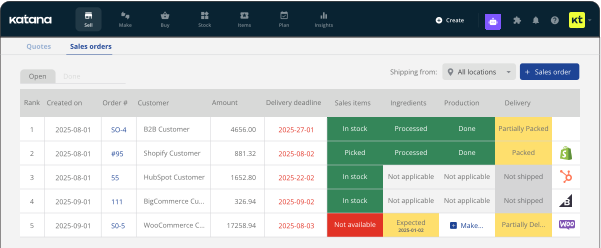
- Sales orders: check, create, and update orders and fulfillments.
Example prompt: “Push the delivery date out by a week on every open order for [customer], and tell me which ones changed.”
- Manufacturing: view and create manufacturing orders, check progress, and identify missing materials. Example prompt: “Based on my open sales orders and current stock, what should I make this week and in what order?”
- Purchasing: review open POs, update supplier quantities, and create new purchase orders.
Example prompt: “Supplier B can only ship 800 of the 1,000 units we ordered. Update the open PO.”
- Products and BOMs: create and update items, materials, and bills of materials. You can even build a BOM from a file or PDF.
Example prompt: “Set up this product line: end product, subassemblies, materials and opening stock. Here’s the spec.”
- Custom fields: create a field definition and apply it to records directly from chat.
Example prompt: “Add a ‘Payment status’ field to my sales orders with the options Awaiting payment, Paid and On hold, then set it on the orders in this list.”
Delete isn’t possible through the connection. Deletion always happens inside Katana.
“A screen grab of a supplier’s invoice, uploaded into our AI chat, now produces an accurate PO in Katana — replacing our Make and Google Sheet workflow. This will save our team countless hours across many scenarios.”
— Spencer Tetrault, Axe & Awl Leatherworks
How to connect
Account owners can connect right away. For other team members, an owner or anyone with “Manage users and permissions” enables Access to MCP first (Profile menu (top right) → Team → user’s name → Admin tab → Access to MCP).
Claude (web or desktop): go to Customize → Connectors, click +, name it Katana, and paste https://mcp.katanamrp.com. Sign in to your Katana account when prompted.
ChatGPT (paid plan): go to Settings → Security and login → turn on Developer mode. Create a New Plugin, name it Katana, paste the same server URL, and sign in to Katana.
In a new chat, pick Katana from the + menu before you ask anything.
Gemini: via Antigravity, Google’s AI development suite. Needs Node.js. Authorize Katana once in your terminal, add it to your config file, and you’re connected.
For any write, ask your AI to outline the change before confirming, so you can review it before anything updates in Katana.
Connect Katana to your AI chat →
Get inventory trends, news, and tips every month
Explore all categories
Get visibility over your sales and stock
Wave goodbye to uncertainty with Katana Cloud Inventory — AI-powered for total inventory control