Amazon FBA vs FBM: which fulfillment method is right for your business?
A practical breakdown of Amazon FBA and FBM: what each model involves and how to choose the right fulfillment method for your business.


FBA and FBM are the two main ways to get your products to customers on Amazon. With FBA, Amazon stores your inventory and handles shipping for each order. With FBM, you keep the stock and ship orders yourself. Both options use the same marketplace and have the same referral fee. The best choice depends on your catalog and your margins, and on how much of the fulfillment work you want to keep in-house. Maybe it shouldn’t even be an either-or case.
This guide explains how each method works and how much each costs, then how to decide which products belong where. Many sellers end up using both, and we’ll cover that too.
FBA vs FBM: a quick comparison
The main difference is who takes care of storage and shipping. With FBA, Amazon handles it. With FBM, you handle it yourself.
| FBA (Fulfilled by Amazon) | FBM (Fulfilled by Merchant) | |
|---|---|---|
| Who stores inventory | Amazon’s fulfillment centers | You, in your own warehouse or 3PL |
| Who packs and ships | Amazon | You |
| Prime badge | Yes | Not by default |
| Customer service and returns | Amazon handles them | You handle them |
| Amazon fees | Referral fee, plus fulfillment and storage fees | Referral fee only |
| Your other costs | Inbound shipping and prep | Warehousing, packing, and carrier shipping |
| Control over packaging | Limited | Full |
| Best suited to | Lightweight products that sell quickly | Bulky, slow-moving, or custom products |
What is Amazon FBA?
Fulfillment by Amazon (FBA) means you send your products to Amazon, and they store them and ship each order for you. Amazon also handles customer service and returns for those orders.
You send stock into Amazon’s fulfillment network, already prepped and labeled to Amazon’s requirements. When a customer places an order, Amazon fulfills it and ships it from the nearest center. Because these products are Prime-eligible, they show the Prime badge and qualify for fast, free delivery to Prime members.
What works well:
- Your products are Prime-eligible, which many shoppers filter for.
- Amazon manages packing, shipping, returns, and customer service, which means you spend less time on order management.
- Fast delivery makes your listing more competitive for the Buy Box.
Important to consider:
- The fees stack up. On top of the referral fee, you pay fulfillment and storage fees, plus surcharges.
- You give up control over your packaging and the unboxing experience
- When stock moves slowly, it becomes expensive, since storage and inventory charges increase the longer it stays in your warehouse.
What is Amazon FBM?
Fulfilled by Merchant (FBM) means you store your own inventory and ship each Amazon order yourself, or through a third-party logistics partner. Amazon lists the product and takes its referral fee, and everything after the sale is your responsibility.
Your product appears on Amazon like any other listing. When an order comes in, you fulfill it from your own stock and ship it with your own carrier account. You choose the packaging and handle returns and customer questions.
What works well:
- Lower Amazon fees. You pay the referral fee and avoid FBA’s fulfillment and storage charges.
- Full control over your packaging, inserts, and the customer experience.
- No FBA storage or aged-inventory fees, which suits slow-moving or seasonal stock.
- The same inventory can serve your other sales channels, since it sits in your own warehouse.
Important to consider:
- Standard FBM listings don’t show the Prime badge, so Prime shoppers may not see your products as easily.
- You carry the shipping cost and the work, and Amazon’s shipping credit may not cover your full shipping expenses.
- Your seller metrics rely on how quickly and accurately you ship orders. If you ship late or make mistakes, it will negatively affect your ratings.
- FBM tends to suit large or oversized products where FBA fees run high, along with slow-moving, seasonal, or custom items. It is also a good choice for sellers who have their own warehouse or use a 3PL and want to manage order fulfillment themselves.
When should you use FBA vs FBM?
Go with FBA for items that sell quickly and are easy to ship. Choose FBM for products that are bulky, slow-moving, or that you’d rather fulfill yourself. Many sellers use both and match each product to the method that fits it best.
By product, small and lightweight items that sell quickly usually do best in FBA because Prime and quick shipping help them sell even faster. Bulky or slow-selling items usually do better in FBM, since you can avoid extra fulfillment and storage fees for items that don’t move quickly.
If you’re just starting out, FBM can help you keep costs low and stay in control while your sales are still small and hard to predict. Once a product proves itself and volume grows, moving it into FBA takes the shipping work off your hands and opens up Prime. Seasonal spikes can go either way, depending on whether you can handle the volume yourself.
You don’t have to pick one method for your whole catalog.
FBA vs FBM fees: which costs more?
It depends on your product’s size, weight, and how fast it sells. Both methods pay Amazon’s referral fee. With FBA, you also pay fulfillment and storage fees. With FBM, you cover your own shipping and warehousing costs instead.
Both methods share the referral fee. Amazon charges this fee on every sale, and for most categories it ranges from 8% to 15% of the sale price. [Confirm current rates against Amazon’s referral fee schedule.]
FBA adds multiple fees on top of the referral fee:
- A per-unit fulfillment fee based on the product’s size and weight.
- Monthly storage fees, charged by the volume your stock takes up and higher during the Q4 peak.
- An aged-inventory surcharge on stock that sits in Amazon’s warehouses too long.
- A fuel and logistics surcharge applied to fulfillment fees.
Your inventory also has to arrive fully prepped and labeled to Amazon’s requirements.
With FBM, you avoid those extra fees. The only Amazon fee you pay is the referral fee, but you are responsible for your own warehousing, packing materials, and shipping costs. Watch out for two often-overlooked expenses: sellers on Amazon’s Individual plan pay a small fee for each item sold, which the Professional plan does not charge. Also, Amazon’s shipping credit for FBM orders is often less than your actual shipping cost.
In general, FBA tends to win on small, lightweight products that sell quickly, where its bulk shipping rates beat a carrier’s. FBM tends to win on bulky or slow-moving products, where FBA’s size-based fees and storage charges pile up. For an exact comparison, run your product through Amazon’s FBA Revenue Calculator.
Can you use both FBA and FBM at the same time?
Yes. Amazon lets you run FBA and FBM on the same account, and many sellers do. You can list the same product using both methods, or split your catalog so that you have fast-selling items on FBA, while FBM is used for products that don’t work as well with Amazon’s fee structure.
Using both methods helps you balance the pros and cons. Place your fast-selling, predictable products in FBA to get the Prime badge and let Amazon handle shipping. FBM tends to suit slower or higher-margin products, since you set the shipping cost yourself and stay in control of how the order reaches the customer. If FBA long-term storage fees increase, switch those items to FBM. If a product starts selling quickly, move it to FBA to keep up.
How do you manage inventory across FBA, FBM, and other channels?
You need to connect every channel to one inventory count to keep every stock in sync across Amazon FBA and FBM and all your other sales channels.
FBA and FBM stock don’t behave the same way. Anything you send to FBA stays in Amazon’s warehouses and can only fulfill Amazon orders. FBM stock stays in your own warehouse, so it’s the same inventory you use for Shopify and other sales channels. So, if FBM orders increase, they use up inventory that other channels are also selling from at the same time, and it’s easy for two of them to commit the same item before your inventory updates, which causes an oversell.
There is also a difference in how much work is involved. With FBA, you send one bulk shipment to Amazon. With FBM, every order comes back to you to pack and ship. As your FBM sales grow, you have more orders to handle yourself and more details to keep track of.
This setup is common for sellers using Amazon like this. Among Katana customers selling on Amazon, 99% track stock across two or more locations, averaging around five, and most sell through at least one channel besides Amazon.
The manual alternative – re-keying each channel’s orders into one place, then updating stock after every batch ships and copying tracking numbers – is slow and easy to get wrong. If you miss an update, you might oversell to a customer or end up with unsold stock.
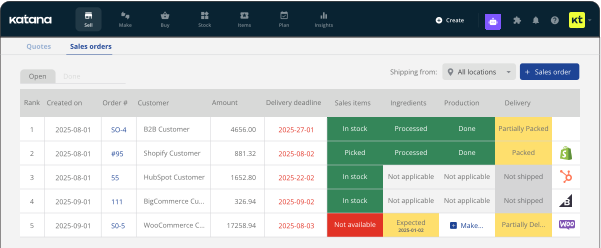
Connecting your inventory removes all those extra steps. One sale updates the count once, and that same number shows up in Amazon, Shopify, and any other sales channel at the same time – so every channel sees the change before the item can oversell. That’s what Katana is for. Your FBA and FBM orders are right next to your Shopify and wholesale orders, and if you make your own products, production uses the same stock count.
Want to know how it all works? Learn more about Katana’s native Amazon integrations.
Get inventory trends, news, and tips every month
Explore all categories
Get visibility over your sales and stock
Wave goodbye to uncertainty with Katana Cloud Inventory — AI-powered for total inventory control