
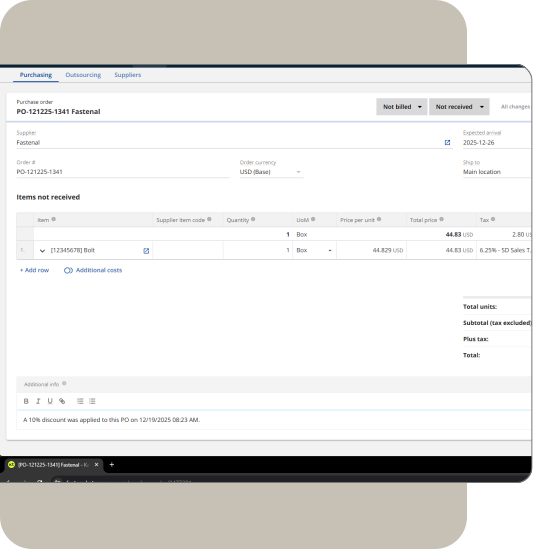
Discount all PO lines at once
Apply a uniform discount across all open PO line items instead of editing each row manually.
Overview
Automatically updates price-per-unit values on all open PO lines and writes a timestamped note in Additional Info for transparency. Helpful for negotiated supplier discounts.
How does it work
- Enter the discount percentage.
- Apply the discount; the tool updates all open rows.
- Refresh the PO to view the changes.
How to get started
- Install the Admin Panel Chrome Extension.
- Open Admin Panel Extension and open any purchase order.

Name
Purchase order bulk discount
Built by
Taylor Made Tools
Documentation
Learn more
Category
Productivity


Manufacturing workflow optimization
Audit and refine your Katana production workflows, stock reservation logic, and reporting structures to reduce friction and support operational growth.

Production & margin visibility optimization
Connect Katana production cost data with revenue performance to surface SKU-level margin insights and support confident pricing and purchasing decisions.

SKU & BOM structural cleanup
Normalize SKUs, variants, and BOM structures in Katana for clean, scalable, and integration-ready product data.

3PL & fulfillment integration
Design and implement structured sync processes between Katana and third-party logistics platforms to keep inventory, orders, and fulfillment aligned.

Disassembly & reverse production workflow
Implement controlled disassembly workflows in Katana for returns, salvage recovery, and rework, using production-based logic instead of manual stock adjustments.

QuickBooks Desktop to QuickBooks Online migration
Review and plan your migration from QuickBooks Desktop to QuickBooks Online with full Katana alignment to protect inventory valuation and reporting accuracy.

Historical order migration to Katana
Import historical sales orders, customers, and revenue records into Katana to preserve reporting continuity during system transitions.

Add new row keyboard shortcut
Adds a universal keyboard shortcut to speed up data entry in editable areas such as SOs, POs, and stock adjustments.